Die Station 2: Edge Trimming, Direct Piercing, and Cam Piercing
Edge Trimming
Post-form trimming is triggered for edge segments whose positional tolerance is tighter than the threshold specified by the cost model variable edgeTrimmingPositionToleranceThreshold (2mm in starting point Digital Factories). If you haven’t specified the positional tolerance of an edge, the cost model assumes the tolerance specified by the cost model variable defaultPositionToleranceEdgeSegment (1.5mm in starting point Digital Factories). Note that all tolerances are bilateral; positional tolerance specifies the diameter of the tolerance zone.
In this example, the tolerance isn’t specified, and so is assumed to be 1.5mm. This is less than the 2mm threshold, so trimming is performed.
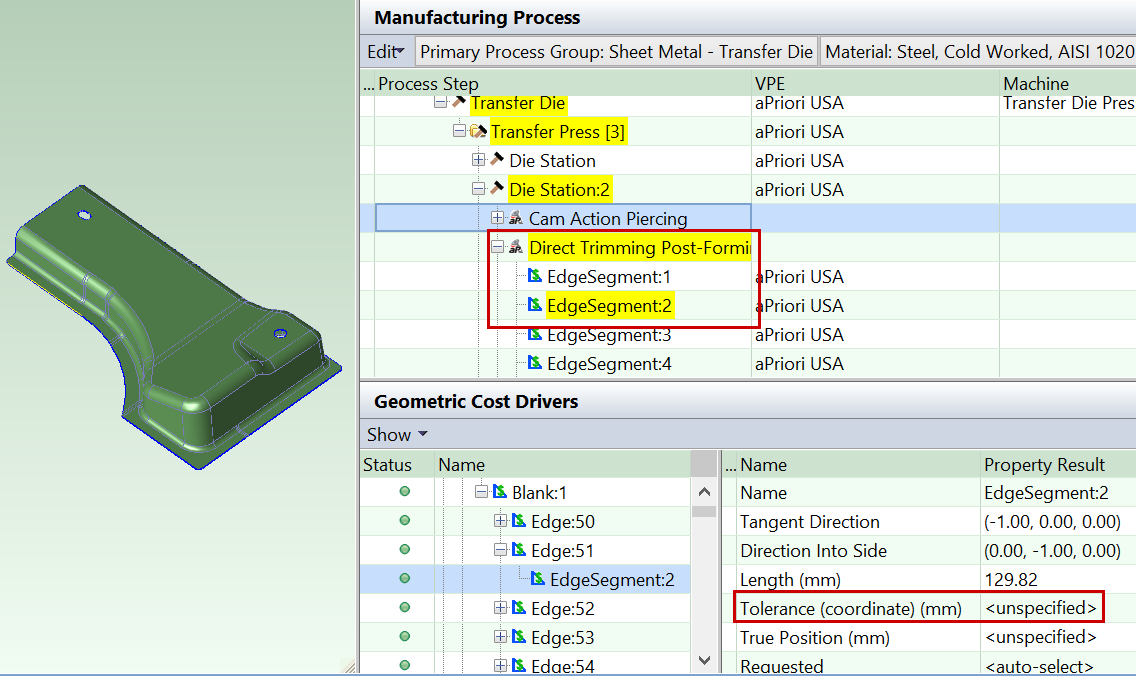
An edge segment can be direct trimmed if both the following hold:
-
It can be accessed from a direction that is sufficiently close to the ram direction.
-
It is not too close to vertical (aligned with the ram direction) or it is short enough and any adjacent edge segments are also direct trimmed.
Other edge segments must be cam trimmed. See Cam Bundling for Transfer Die.
You can customize what counts as sufficiently close to the ram direction with the cost model variable maxRamDirectionTangentAngle (30 degrees in starting point Digital Factories).
You can customize what counts as too close to vertical with the cost model variable minOpenAngleEdgeTrimming (3 degrees in starting point Digital Factories). And you can customize what counts as short enough with the cost model variable verticalTrimLengthThreshold (25.4mm in starting point Digital Factories.)
All edge segments in this example can be direct trimmed.
Direct Piercing
In this example, the holes on the top of the part are accessible from a direction that is sufficiently close to the ram direction, and so are direct pierced. The cost model variable maxRamDirectionTangentAngle(30 degrees in starting point Digital Factories) controls the threshold for both edge trimming and hole piercing.

Other holes must be cam pierced; see Cam Piercing.
Cam Piercing
The hole on the vertical side of the part is not accessible from a direction that is sufficiently close to the ram direction, so it is cam pierced. You can customize what counts as sufficiently close for these purposes with the cost model variable maxRamDirectionTangentAngle (30 degrees in starting point Digital Factories).

The same cam can do both trimming and piercing, and can generally handle both multiple edges and multiple holes, as long as all the features are accessible from the same direction. Cams are represented by CamBundle GCDs, and the Geometric Cost Drivers pane allows you to see which features each cam handles. See Cam Bundling for Transfer Die.
By default, aPriori assumes that the presence of cams does not require an IDLE station to accommodate extra space for the cam units. But you can override the default by enabling auto-inclusion of IDLE stations; see Enable Auto-Inclusion of IDLE Stations.
Die Station 3: Restriking
In this example, Restriking is performed on the drawn form, because the selected material has a tensile yield strength that exceeds the value of the cost model variable matlYieldStrengthRestrikeThreshold (344.74 N/mm2 in starting point Digital Factories).


Restriking is also sometimes performed for a number of reasons besides material strength:
-
Width-to-depth ratio: the form’s width-to-depth ratio is less than the cost model variable widthToDepthRestrikeThreshold (0.5 in starting point Digital Factories). The width-to-depth ratio is the SER Width divided by the sum of Depth Up and Depth Down.
-
Depth-to-thickness ratio: the ratio of the form’s depth to the blank’s thickness is less than the cost model variable depthToMatlThicknessRestrikeThreshold (1000 in starting point Digital Factories). The depth-to-thickness ratio is the sum of Depth Up and Depth Down divided by the material thickness.
-
Minimum radius of curvature: the form’s smallest radius of curvature is less than 10 times the blank thickness. You can customize the blank thickness multiplier (10 in starting point Digital Factories) with the cost model variable minRadiusOfCurvatureRestrikeThresholdMultiplier.
-
Surface tolerance: the tolerance some surface of the form is tighter than the cost model variable minFormSurfaceToleranceRestrikeThreshold (0.5 in starting point Digital Factories).
Restriking can occur on the same die station along with multiple other operations, providied those operations are not perfomed on the surfaces being restruck and do not otherwise interfere with the restriking operation and tooling.